
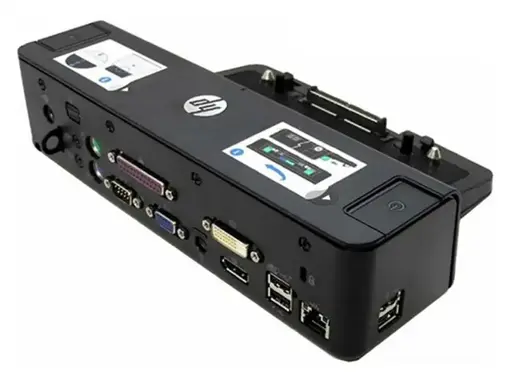
I have the old style docking station for a 2013-ish laptop. When the laptop is powered off, the DVI-attached LCD flashes “entering energy savings mode” every second or so, non-stop. Is it normal? Anyone experience this? My search comes up dry, so I wonder if this is a manufacturing defect that just affected my unit.
One ugly hack is to unplug the docking station from mains whenever the laptop is off. But the other problem is when the laptop screensaver goes on while it’s running, the laptop screen goes black (as expected), but then the external display enters the same loop.
I did more tests. Findings:
HP dock (dvi) → Lenovo LCD :: works
HP dock (vga) → Lenovo LCD :: works
HP dock (dvi) → Dell LCD :: sleep mode on/off loop every second
HP dock (vga) → Dell LCD :: no signal
desktop dell (vga) → Dell LCD :: works
Thinkpad dock (dvi) → Dell LCD :: works
I don’t think we can conclusively blame something specific because everything works with /something/. I guess the two LCDs could do sleep mode differently. They have timers and enter sleep mode after 5 min, but when Kali triggers the screen saver (blank), the LCD is smart enough to instantly go into sleep mode. So it’s not just a lack of signal but apparently a signal is sent to LCD to trigger instant sleep (IIUC).
(edit)
Interesting thing with the Lenovo LCD: it has its own screen saver animation. So when Knoppix launched an animated screen saver (in clone mode), the Lenovo throws up a very different animation of its own. How cool is that… Confirms that there is a forced “go to sleep” signal sent to the LCD.Shit, nevermind… it was extended mode not clone mode, so it’s possible that knoppix just sent a very different screensaver to each screen.With the HP dock working with both video interfaces with the Lenovo LCD, I think we can call the HP dock working. With the Dell LCD not working at all on VGA and having the strange behavior on DVI, I think we can call the Dell LCD not working/incompatible with this dock. If you really wanted to chase it further, I’m wondering if Windows 7 or 8 (contemporary for the day when this dock was originally in use) might work with the Dell LCD. As it is, the Dell LCD doesn’t sound it works with this dock and Knoppix.
You did good testing and produced good results. You have at least one config where it works, and you can possibly source other LCDs which are compatible on both video interfaces.